

『Flow Meter Digital Display Programming: Configuring Flow Rate Units and Batch Totalizers』Related information(v cone flow meter|rotary gas meter|gallon meter|gear meter|metal tube rotameter|glass tube rotameter|nutating disk meter|transit time ultrasonic flow meter|wedge flow meter|pd meters|hydraulic flow meter|ultrasonic water flow meter|water flow meter|air flow meter|magnetic water flow meter|oxygen flow meter|gas flow meter|argon flow meter|air velocity meter|gasoline flow meter|fuel flow meter|ultrasonic water meter|digital water meter|nitrogen flow meter|solid flow meter|Oxygen tank flow meter|digital water flow meter|diesel fuel flow meter|steam flow meter|02 flow meter|compressed air flow meter|oil flow meter|liquid flow meter)
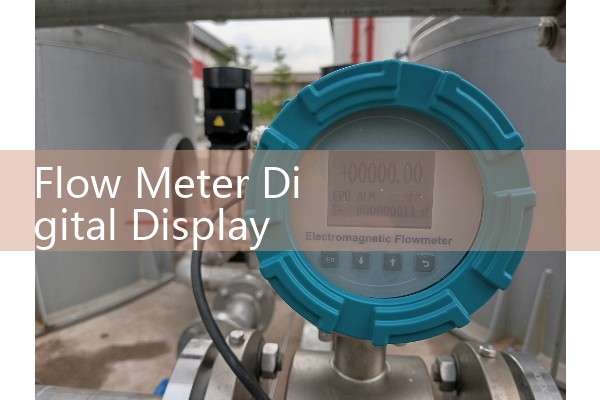
Flow Meter Digital Display Programming: How to Configure Flow Rate Units and Batch Totalizers
Quick Answer: Flow meter digital display programming lets you set flow rate units such as kg/h, L/min, or m3/h and configure batch totalizer values for filling or batching operations. Silver Instruments ships every flow meter with a preconfigured display based on your process fluid and pipe size. If you need to change units or batch settings on site, the menu path takes about three minutes once you know the key sequence.
Most engineers skip this part during commissioning. Then a batch overfill happens. We have seen this on customer sites in Vietnam, Indonesia, and Chile. A paint manufacturer in Southeast Asia called us last year because the display showed total flow in liters but the PLC expected kilograms. The batch controller kept overfilling by 12 percent. That problem took one phone call to fix.
What You Can Program on the Digital Display
The digital display on Silver Instruments flow meters stores parameters in nonvolatile memory. This means power loss does not erase your settings. You can program flow rate units, totalizer units, batch setpoint, pulse output scaling, 4 to 20 mA output range, and damping time.
For Coriolis mass flow meters, the default flow rate unit is kg/h. For electromagnetic flow meters, the default is m3/h or L/s depending on pipe size. DN15 electromagnetic meters often ship with L/min as default. DN100 and larger typically use m3/h. You can change these defaults through the front panel keys or through HART communication.
Configuring Flow Rate Units Step by Step
Here is the standard menu path for Silver Instruments flow meter displays. Press and hold the SET key for three seconds. Enter the password. The default password is 0000 for most models. Navigate to the UNIT menu using the arrow keys. Select FLOW RATE. Choose from kg/h, kg/min, g/s, t/h, L/min, L/h, m3/h, GPM, or barrel per day.
The display shows flow rate with three decimal places by default. For high viscosity fluids like heavy fuel oil or molasses, engineers often set the decimal point to one or zero places. This reduces display flicker and makes readings easier for plant operators. A sugar mill in Thailand uses t/h for final syrup flow. A desalination plant in Oman uses m3/h for the brine line. Both meters ship with the correct units from our factory.
In practice, changing units on site takes less than two minutes. Press SET to confirm each selection. The display returns to the main measurement screen automatically after 30 seconds of inactivity. Some users prefer to lock the menu after configuration. You can set the password to a custom four digit value to prevent unauthorized changes by shift operators.
Batch Totalizer Setup for Filling Operations
Batch totalizer configuration matters for food and beverage plants, chemical dosing systems, and paint mixing stations. The flow meter display can trigger a relay output when the batch total reaches a preset value. This relay closes a valve or stops a pump. The batch quantity is programmed in the same unit as the totalizer.
A typical batching sequence works like this. Operator presses the START button on the display or a remote push button. The batch total resets to zero. Flow begins. The totalizer counts upward. When the total reaches the batch setpoint, the relay output activates and flow stops. The display holds the final batch total for ten seconds before resetting.
We recommend setting the batch setpoint slightly below the target fill volume to account for valve closing time. For example, a chemical distributor in Brazil fills 200 L drums. The valve takes about 0.8 seconds to fully close. At a flow rate of 180 L/min, that means 2.4 liters of overfill during valve closure. So the batch setpoint should be 197.6 L, not 200 L. This compensation feature is called overrun correction or valve delay compensation in the programming menu.
Common Programming Scenarios on Customer Sites
A water treatment plant in the Philippines uses electromagnetic flow meters for chemical dosing. They needed to switch from L/min to mL/min for a coagulant injection line. The pipe size is DN15. The flow range is only 0.05 to 0.5 L/min. Displaying this in L/min shows numbers like 0.127, which is hard for operators to read. Switching to mL/min shows 127 mL/min as an integer. Much easier for shift logs.
A diesel fuel loading station in Kenya uses oval gear flow meters for truck filling. The display needed to show both flow rate in L/min and batch total in liters. They also needed a pulse output to the PLC for remote monitoring. Silver Instruments configured the pulse output at 100 pulses per liter before shipping. The customer only had to enter the batch setpoint for each truck size.
A marine fuel oil tran
Wiring and Communication During Programming
You can program the display while the flow meter is powered and measuring. The 4 to 20 mA output remains active during menu navigation. So the PLC does not lose signal when you change settings. This is useful in continuous processes where the loop cannot be interrupted.
If you have many flow meters across a plant, HART communication is the faster option. Connect a HART communicator or a laptop with a HART modem across the 4 to 20 mA loop. Download the configuration file from one meter. Upload it to all other meters of the same model. This takes seconds per meter instead of minutes of button pressing.
Silver Instruments flow meters support Modbus RTU over RS485 as an option. This allows you to read flow rate, totalizer, and batch status from a PLC or SCADA system. You can also write new batch setpoints remotely. A dairy plant in Mexico uses this feature to change batch sizes from the control room without sending a technician to the production floor.
Firmware and Factory Default Settings
Every Silver Instruments flow meter leaves the factory with a configuration sheet inside the shipping carton. This sheet lists the flow rate unit, totalizer unit, damping time, output range, and pulse scaling programmed for your order. Keep this sheet with your plant documentation. If someone resets the meter to factory defaults, you can restore the correct settings from this sheet.
The reset function is located in the SYSTEM menu under RESTORE DEFAULTS. Do not use this unless you have the configuration sheet or a backup file. Restoring defaults wipes all custom settings including the password, output calibration, and unit selections. We have received calls from customers who lost their settings after a reset and could not recall the original configuration. That is why we document everything at the factory.
Selecting the Right Flow Meter for Batch Applications
For batch totalizer applications, response time matters more than laboratory accuracy. The flow meter must update the display and totalizer quickly enough to catch fast flow changes. Coriolis mass flow meters update every 10 milliseconds. This is fast enough for most filling operations. Electromagnetic flow meters update every 100 to 500 milliseconds depending on the model. For very fast filling of small containers, oval gear flow meters offer fast response and high resolution.
Silver Instruments offers Coriolis mass flow meters, electromagnetic flow meters, and oval gear flow meters with digital display programming for flow rate units and batch totalizers. Tell us your fluid type, flow range, pipe size, and the unit you want displayed. We configure the meter before shipping. Send your process details to our engineering team. Tel: +86-25-68650347. Whatsapp: +86-25-52155837. WeChat: +86 15365082610.
FAQ
Question: How do I change the flow rate unit from kg/h to L/min on a Silver Instruments flow meter?
Answer: Press and hold the SET key for three seconds. Enter the default password 0000. Navigate to UNIT, then FLOW RATE. Select L/min from the list. Press SET to confirm. The display returns to the main screen after 30 seconds.
Question: Can I program the batch totalizer from the front panel without a computer?
Answer: Yes. All Silver Instruments flow meters with totalizer function support front panel batch setpoint programming. Use the arrow keys to enter the SET BATCH menu, type the desired batch quantity, and press SET. No laptop or software is needed.
Question: What is the maximum batch setpoint value?
Answer: The maximum batch setpoint is 9999999 in the displayed unit. For kg/h totalizers this means 9,999,999 kg per batch. For m3/h totalizers this means 9,999,999 m3 per batch. Most industrial filling operations never approach this limit.
Question: Does the flow meter retain settings after a power failure?
Answer: Yes. All programming parameters are stored in nonvolatile memory. Power loss does not change flow rate units, totalizer units, batch setpoints, or output scaling. The meter resumes measurement immediately when power returns.
Question: Can Silver Instruments configure the display before shipping so it works out of the box?
Answer: Yes. When you place an order, tell us the process fluid, flow range, operating temperature, pipe size, and the units you want on the display. We program the meter at the factory. You only need to mount it, connect power, and start measuring.
 Hot Blog
 Related AD